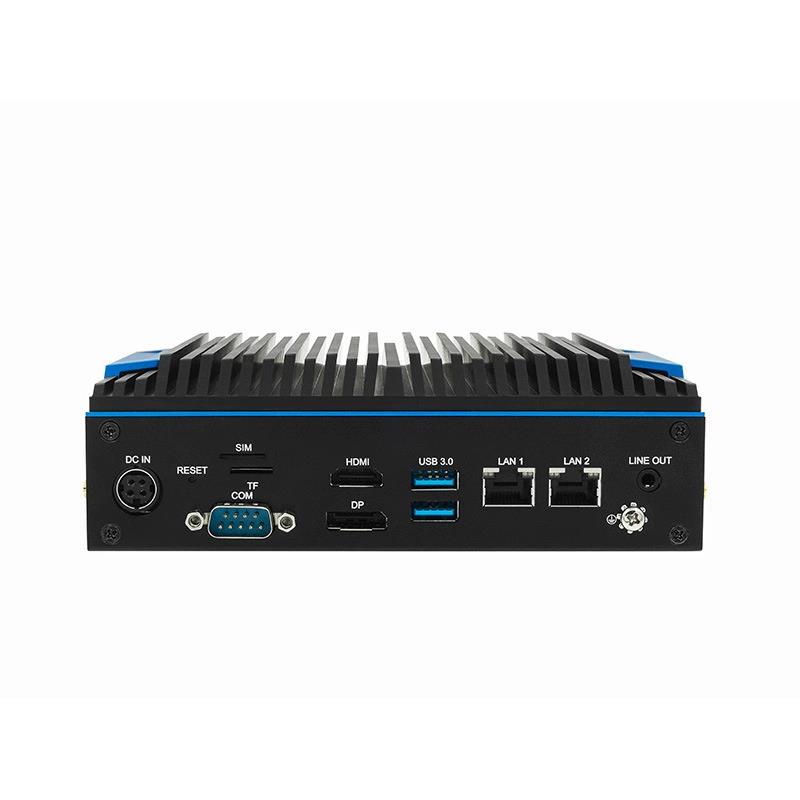
Detailed application directions built around one configurable C5 BOX platform.
Android 12 option
Platform
HDMI + DP
Displays
4 x USB
Peripherals
Ethernet / Wi-Fi / 4G option
Connectivity
Why this application is difficult
Design for the real deployment, not only the demo.
Each page separates the hardware foundation from project-specific software, environmental, security and acceptance requirements.
01
Stores combine many functions
Displays, cameras, printers, scanners, readers and networking often need one managed endpoint.
02
Playback must survive outages
Local cache, startup behavior and recovery matter more than a cloud-only demo.
03
Analytics creates privacy obligations
Footfall and dwell metrics should minimize identity data and define retention.
04
Fleet operations decide total cost
Provisioning, monitoring, updates and replacement must work across many sites.
Reference architecture
A clear path from source to business outcome.
Interfaces and responsibilities are frozen during feasibility review and verified with the target equipment.
STORE INPUTS
Cameras and peripherals
Defined cameras, scanners, printers, readers and sensors.
EDGE TERMINAL
C5 BOX
Android app, CMS, local analytics, cache and device services.
IN-STORE OUTPUT
Displays and interaction
HDMI/DP content, touchscreen workflow and peripheral response.
CENTRAL OPS
Retail backend
Content, configuration, health, events and support workflow.
Detailed capabilities
What the solution must do.
C5 BOX supplies compute and I/O. The complete solution includes project software, configuration, documentation and evidence.
Digital signage
Run the selected Android CMS, cache media and recover playback after restart or network loss.
Local analytics
Produce anonymous counts, queue or dwell events only after camera and model validation.
Peripheral integration
Connect approved scanners, printers, readers, touch devices or cameras over USB/serial.
Dual display
Use HDMI and DP outputs with a tested resolution, orientation and content layout.
Fleet readiness
Define enrollment, configuration, logs, remote update, rollback and swap procedure.
Deployment method
Move from requirements to a repeatable rollout.
Use gated engineering steps so that performance, responsibility and support boundaries are visible before production.
01
Store workflow
Map content, analytics, peripherals, network and staff interactions.
02
Compatibility lab
Test CMS, displays, media, USB devices and selected cameras.
03
Offline behavior
Validate boot, cached playback, queueing and recovery without WAN.
04
Privacy review
Define anonymous processing, retention, access and signage obligations.
05
Fleet pilot
Deploy to representative stores and measure uptime and support effort.
PoC and acceptance
Evidence to collect before production.
Acceptance criteria should be written into the PoC plan and measured under representative load and failure conditions.
Display
Resolution, refresh, orientation, EDID, sleep/wake and dual-display behavior.
CMS
App compatibility, startup, cache, scheduling, update and recovery.
Peripherals
Driver and power compatibility for every connected device.
Analytics
Camera position, model metrics and anonymous data design.
Network
Store firewall, bandwidth, offline interval and reconnect behavior.
Fleet
Provisioning, monitoring, update, rollback, support and device replacement.
Solution boundary
Position C5 BOX as an intelligent retail endpoint, not a commodity media player. Analytics results depend on the selected camera, model and environment; privacy compliance is project-specific.
Recommended starting configuration
C5-BOX
Finalize the SKU only after the interfaces, workload, environment, software scope and certification route are known.